
Picture This
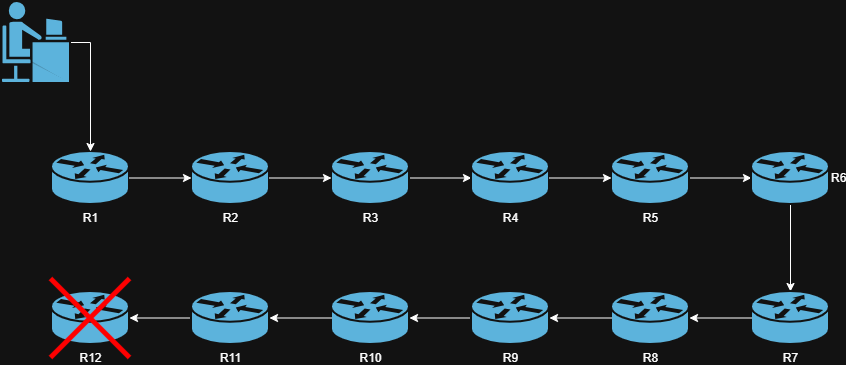
You're working on a router remotely, for some reason you forgot to turn on safe mode, and you misclick. Suddenly interface counters stop incrementing, and a few seconds later Winbox closes. You Stifle a string of curse words as reality sets in:
- It's Friday
- That router was the route reflector for the whole network - everything is down (you only had one??)
- It's at the opposite end of the network - 3 Hours away
- It's almost peak time
- Calls are rolling in
Now What?
Well, if you're lucky, you have out-of-band access or another trick to get in.
If you're not, well, you grab your keys, hop in the truck, drive 3 hours there, run those 2 commands you were trying to run, and drive 3 hours back.
Prevent the Truck Roll
This entire situation is what RoMON exists to solve.
By simply enabling RoMON, you make it dramatically harder to lock yourself out of a MikroTik device.
In the scenario above, even if:
- Every router in the path has a broken IP configuration
- There is no working routing
- The device has nothing configured beyond RoMON itself
You can still regain full WinBox access to the target router by connecting through another MikroTik device.
No routing
No IP reachability
No truck roll
How
Open Winbox, enter the IP, or MAC(or select from the neighbors list) of any router in line, but instead of hitting the Connect button, hit Connect Via RoMON. You'll then be shown a list similar to neighbors with every Mikrotik device this router sees with RoMON enabled.
From there, select a device from the list enter the credentials for that device and hit Connect.
Like Magic, you're back in that device via winbox, or terminal
So...How Does It Work?
RoMON (Router Management Overlay Network) is a proprietary MikroTik management protocol built into RouterOS.
At a high level:
- RoMON operates at layer 2
- It does not rely on IP addressing, routing tables, or VRFs
- It uses MAC-level forwarding to hop between MikroTik devices
- Devices automatically discover each other and form a management web
Under the hood:
- RoMON uses its own EtherType (
0x88bf) - Devices exchange discovery and forwarding information to build a web of connected devices
- WinBox queries this web and dynamically selects the best path
- Traffic is forwarded hop-by-hop across MikroTik devices to their destination
- RoMON is ONLY for management and is not used for user traffic.
RoMON is a Management OVERLAY that rides on top of Layer-2 connectivity.
Final Notes and restrictions
Romon is a Layer 2 protocol, but some switches choose to block unknown ethertypes (edgeswitches are commonly seen paired with mikrotik but don't support the RoMON ethertype without adding a filter)